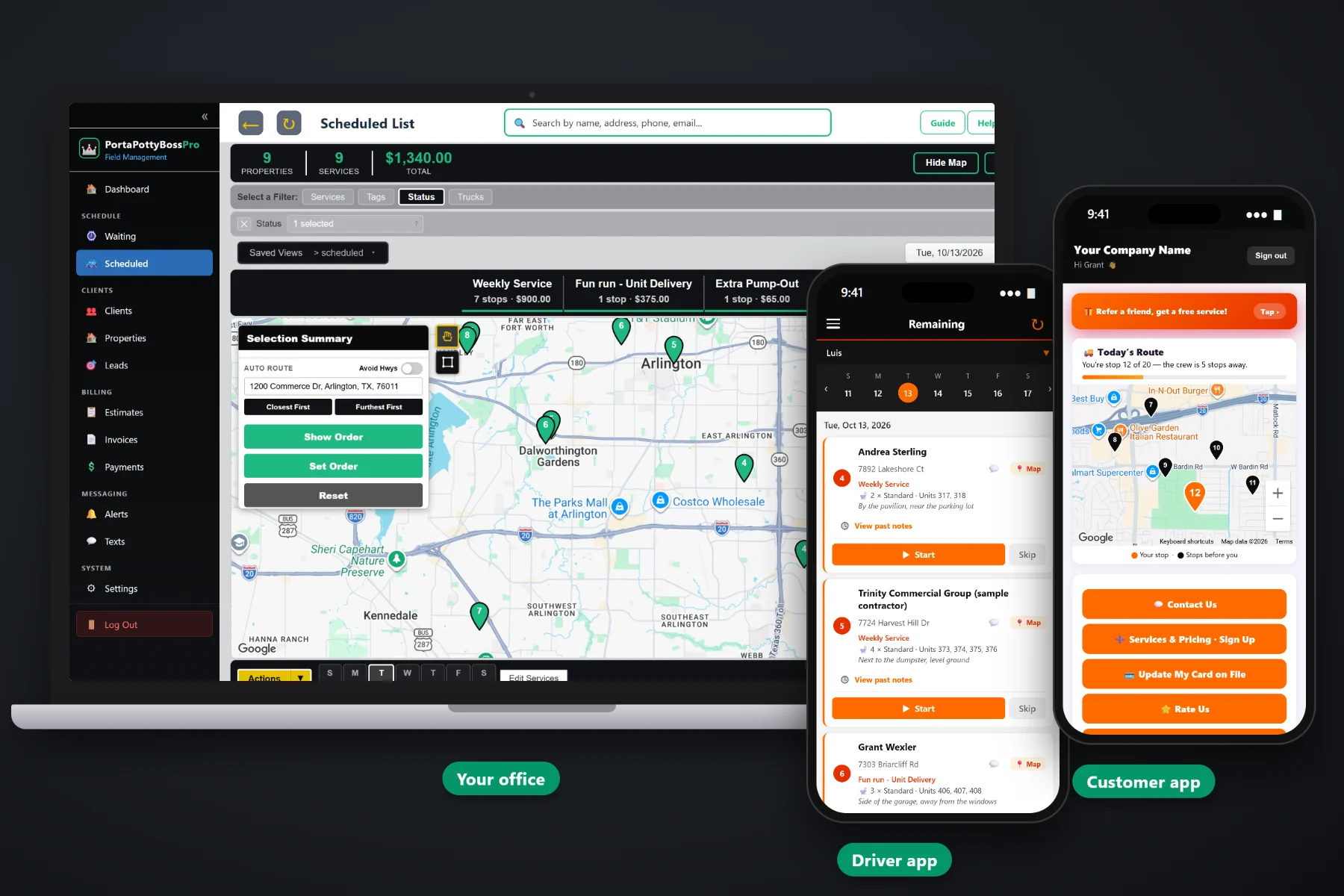
A portable toilet route is weekly service that comes due on its own, deliveries that have to land before an event, pickups that end a rental, and the emergency pump-out that rings in at 10:30. PortaPottyBossPro puts every open stop on a live Waiting List map, lets you build each truck's day and set the order from the yard, sends the route to the driver's phone, shows your crews on the office map, and texts customers when the truck is on the way.
Plans start at $59/month and you are never billed per user, so every dispatcher, driver and weekend fill-in gets a login. The Waiting List map, dispatch board, route order, driver app, crew GPS and customer texts are part of the platform, not add-ons. To see how routing fits with rentals, quotes and billing, start at PortaPottyBossPro and then dig into routes and dispatch here.
Every delivery, weekly service, extra pump-out and pickup that still needs a truck, as pins on a live map colored not due, due and overdue.
Jobs by day on a week strip, filtered by truck, with totals of stops and dollars per service before the truck leaves the yard.
Auto-route Closest First or Furthest First from the yard, then drag the few stops with gates or time windows into place.
Jobs in order with navigation, unit type, quantity, unit numbers and placement notes, plus Start, Skip and Complete.
See where every crew is on the office map, so same-day calls go to the truck that is actually nearby.
Automatic on-the-way and arrived texts, and a customer app that says You're stop 12 of 20 — the crew is 5 stops away.
Weekly service sites come due on their own, using each service's minimum days between visits. New deliveries, extra pump-outs and pickups land on the same map. Pins turn from not due to due to overdue past a 7-day grace, so the dispatcher sees where work is piling up in one glance instead of reading a whiteboard.
Route planning should not take a highlighter, a paper map and an hour on the phone with the driver. With your areas and service frequencies set, building a truck's day comes down to a few clicks and a quick read of the notes.
Bring in your customer list by CSV, add job sites with their units and placement notes, and set the days between visits on each recurring service.
Open the Waiting List, clear the overdue pins, and select the due stops in the day's area along with deliveries and pickups that fit.
Assign the stops to a truck and day, then auto-route Closest First or Furthest First from the yard and drag any stop with a time window.
The route shows in order on the driver's phone, crew GPS shows on the office map, and on-the-way and arrived texts go out automatically.
Generic field-service software assumes one tech, one address, one visit. A portable toilet route is recurring service on a rhythm, units spread across big sites, rentals that end, and trucks that carry different loads. A list of addresses leaves the hard part in the dispatcher's head.
Ask any portable toilet dispatcher how routes really get built and you will hear the same story: a whiteboard in the yard, a spreadsheet only one person understands, paper route sheets that leave the truck smudged and wrong. Which site got skipped last Thursday and never went back on. Which truck is closest to the contractor who just called. Which units on the twenty-acre site are yours.
That information belongs on the map and on the job, not on a sticky note. When it does, any dispatcher can build any route and any driver can run it, and nothing slips because one person was out sick.
PortaPottyBossPro keeps the open work, the trucks, the route order and the customer in one place, from the first delivery to the final pickup and the paid invoice.
Every tool here exists to get trucks through a full day of service, deliveries and pickups with fewer miles, fewer missed stops and fewer where-is-the-truck calls.
Every delivery, weekly service, extra pump-out and pickup still to go out, on a live map and list.
Pins colored not due, due now, and overdue past a 7-day grace, driven by each service's days between visits.
Jobs by day on a week strip, filtered by truck, with stop and dollar totals per service.
Closest First or Furthest First from the yard in one click, with drag-to-reorder for the stops that need it.
Assign stops to service trucks and delivery trucks by day, and assign drivers to trucks.
Standard, Deluxe Flushing, ADA Accessible, High-Rise / Crane, Hand Wash Station and Restroom Trailer, with quantity and unit numbers.
Where the units sit on the site, shown under the address on the lists and on the driver's phone.
Company login plus a personal PIN, jobs in route order, navigation, Start, Skip, Complete and photos, on iPhone and Android.
Crew locations from the driver app on the office map for same-day calls and customer questions.
Sent automatically from the driver app as the route is worked. Customers choose their alerts.
Customers see today's route on a live map and their place in line, without seeing your other customers.
Replies about gates, placement or extra units land with the office, tied to the customer.
Delivered and picked-up dates, days included and a per-day rate after, with extra days invoiced automatically.
Drivers clock in and out, so you have real hours to measure each route against.
Completed stops become invoices, with card-on-file charges and monthly statements for contractor accounts.
Every driver gets the app. Plans are Start $59, Pro $89, and Crew $199 per month, not a per-seat charge.
The cleanest routes give each truck its own part of the map on each day. Pump trucks run steady weekly service loops. Delivery trucks carry units out before events and bring them back after. When one truck has to do a bit of everything, the board shows what it is carrying at every stop so deliveries go early and pickups go late. When a same-day call comes in, crew GPS on the office map shows which truck is really closest. For the full walkthrough, read Portable Toilet Route Software: The Complete Guide to Planning, Dispatching and Running Service Routes.
A superintendent wants to know when the units get serviced. An event planner wants to know the delivery is coming. A rural customer needs to drive out and open the gate. The driver app sends on-the-way and arrived texts automatically, customers choose alerts for the night before, when they're next and when the tech arrives, and the customer app shows today's route with their stop number and how far away the crew is. Replies come back to the office through two-way texting.
Pick the plan that fits your operation. Every plan starts with a 14-day free trial and no credit card.
Compare plans on the pricing page.
Each recurring service has a minimum number of days between visits. When that many days have passed since the last completed visit, the stop comes due on the Waiting List map on its own. Pins show not due, due now, or overdue past a 7-day grace, and the dispatcher assigns due stops to a truck and a day.
On the dispatch board you can auto-route a truck's stops Closest First or Furthest First from the yard, or drag stops into the order you want. Most dispatchers auto-route first and then move the few stops with gates or time windows. The driver's phone shows the same order.
Yes. Assign stops to any truck and day, filter the board by truck, and see stop and dollar totals for each day. Drivers are assigned to trucks and see their own route in the driver app. You are never billed per user.
Crew GPS from the driver app shows on the office map, so you can answer customer calls and send same-day work to the nearest truck. It tracks your crews, not the toilets themselves.
Automatic on-the-way and arrived texts from the driver app, alerts they choose for the night before, when they're next and when the tech arrives, and a live route view in the customer app with their stop number and how many stops away the crew is.
Start is $59/month, Pro is $89/month, and Crew is $199/month. Plans include a monthly text allowance, you are never billed per user, and every plan starts with a 14-day free trial with no credit card.
Routes and dispatch are one piece of how PortaPottyBossPro runs a portable toilet company. For rentals, quotes, contractor accounts and billing, see the full platform overview.
Practical reading on the Waiting List map, building a day's route, route order from the yard, splitting work across trucks, same-day and emergency calls, weather, crew GPS, customer texts and measuring your routes.
Every open stop on one map, routes in order from the yard, the route on every driver's phone, crews on the office map and customers who know when the truck is coming. Try PortaPottyBossPro free for 14 days.